


Client portals can be so helpful when it comes to interacting with your team and your clients as a designer. Back and forth information, tracking design proofs and revisions, and providing files to your clients can all be a pain to keep up with – especially if those things are all happening in an ever-growing email inbox or in a bunch of different systems with different logins. Not only are you confused…but your clients definitely are! Enter a client portal for designers that keeps everything in the same place, in one easy-to-access portal.
Today, we’ll use our sponsors, Assembly, as an example of how to set up an incredible client portal for designers! You can use my code, LANEY, for $100 off any of their plans! They are one of the most robust client portal platforms out there, and so easy to customize to your needs.
So how do you build a great client portal as a designer?
- First, identify what you need in your client portal
- Second, make sure you have all your apps set up and connected
- Third, send your client portal out to all of your clients
- Fourth, enjoy your free time!!!
Let’s start from the beginning!

What do you need in your client portal?
Many of us think of a client portal as a way to share information in one direction. But you can make your client portal as interactive as possible! You might be relying on outside systems for communicating with your clients – anything from Google Forms to AirTable to Proofing Software and more. All of this can be brought directly into Assembly seamlessly, making it a great client portal for designers.
Here are some things you might want to include in your client portal:
- Welcome + Onboarding Information
- Billing and Invoicing
- Contracts
- Questionnaires and forms
- Proofing
- Task Management
- Team-Only Back-End Systems
- Dashboards / Data Views
- Add-On Services
- File Sharing
- …anything else you need to run your design business!

Real-Life Example: My Wedding Invitation Client Portal Setup
- Welcome message with instructions, office hours, and a welcome video!
- Messages to get in touch with me
- Billing where they can view invoices and pay
- Files for sharing back and forth – they can upload their inspiration images and I can upload files for them if needed too
- Contracts
- Address Template – a linked Google Sheet where they can enter guest address info
- Trello Board – just for my team on the back-end to manage the project
- Invitation Information Questionnaire for them to send me all the details of the wedding
- Timeline + Project Tracker for them to keep track of their project
- Latest Proofs – I link these directly from Adobe Illustrator and they can leave revision notes and comments on them as needed!
Now how do we set all of this up for each client? Here is a video showing all of this behind the scenes!
Setting Up your Client Portal Apps in Assembly
Assembly has 3 ways to connect an app into your portal
Built-In Assembly Apps
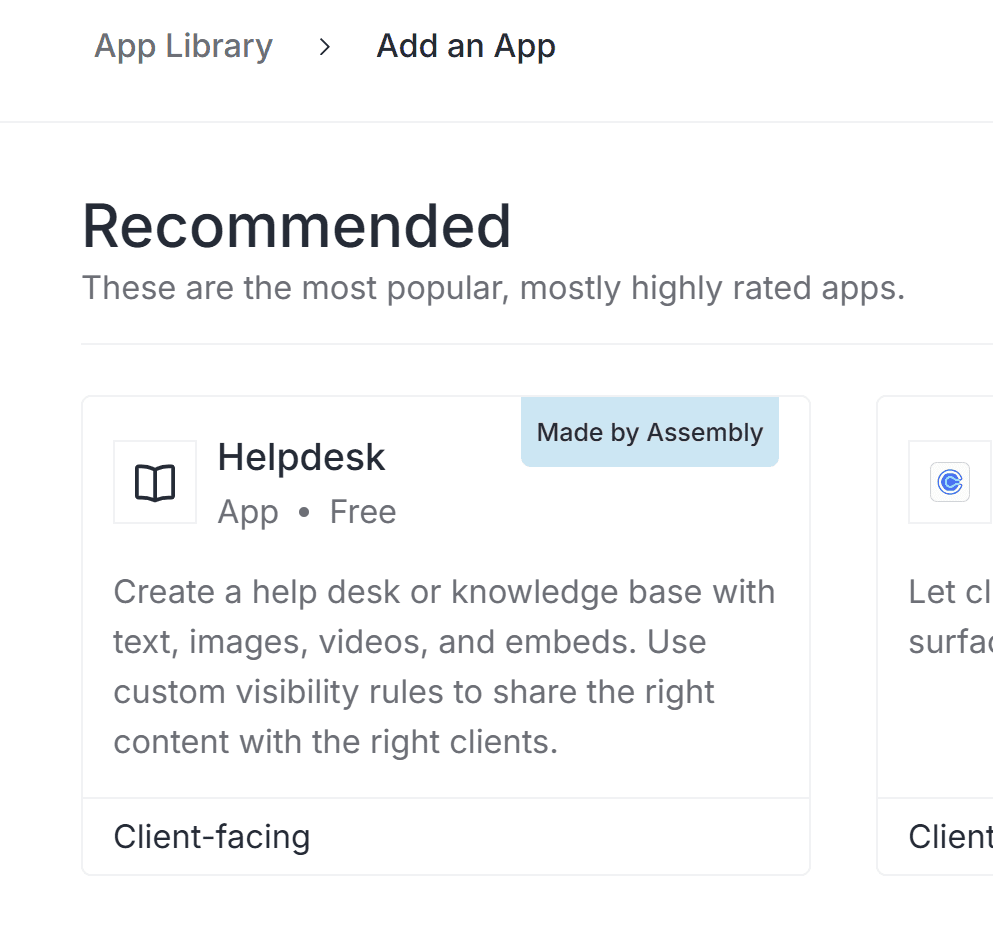
Assembly has built several apps that you can add into your portal that are native to the system. These include billing, tasks, contracts, and questionnaires! These native apps will replace some of the things you might already be using (ie: Google Forms, PDF contracts, etc.), and they are customizable and easy to access.
Simply go to “App Library” > “Add an App” and you’ll see the “Made by Assembly” blue badge on those apps.
Embeds and Links
Embeds and links are basically anything you can embed or link into Assembly! This is where you will be able to combine all the apps that you already use elsewhere into one system.
There are many embeddable services already set up in Assembly – when you go to “App Library” you’ll see tons of options that you probably recognize:
- Google Drive (Sheets, Forms, Docs, etc.)
- AirTable
- Calendly
- Trello
- YouTube
- TypeForm
- Loom
- Notion
- …and so many more!
Custom Embeds in Assembly
You can also embed anything that you need to in Assembly, even if it’s not on this list! As an example, I used another CRM for scheduling appointments for my business, and I was able to directly embed that scheduler into my Assembly portal. All you need is the embed code, and to click “Embeds and Links” at the top of the App Library!

Embeds will be seamless in your portal, so when the client clicks on them, everything will be workable within that window! As an example, my clients can click on their Address Template, and just start typing the addresses like they are in Google Sheets. The file will update on my end, but they don’t have to login separately to Sheets or find the template link or anything! It’s all in one place!
Custom Links in Assembly
Custom links are similar to embeds in that you can link basically anything – but some things just don’t come with embed code. Or maybe it’s an outside website you want to link as a resource. An example of this is that my Adobe Illustrator design proofs are not embeddable, so I linked them instead. When the client clicks on that “app” in their dashboard, the link to their proof will open in a new window. So it’s not as seamless as an embed, but still means they don’t need to keep track of links or login to a new system!
Custom Apps
The third option, custom apps, are also possible with some additional tech knowledge (I’ll be honest, this is above my head a little)! Feel free to contact Assembly if you have questions about these – but I haven’t found anything so far that I couldn’t link or embed in Assembly very easily.
App Access Permissions
When adding apps, you can choose who has access to them. Options include:
- Apps that are only viewable to your team (no clients)
- Apps that are viewable to all clients
- Apps that are viewable to certain clients or companies (groups of clients)
- Apps that show custom data for every client
This last one is extra fun! I mentioned our Address List Template – this needs to be unique for each client. So I create a Google Sheets file for each client, and then embed THEIR sheet only to their client portal. For each new client, I can connect a new sheet, so none of the clients are interfering with each other’s data.
In the app setup screen, you’ll see this “Setup Type” dropdown, and you can select Automatic if you want the app showing up the same way for everyone, or Manual if you want to manually connect different data for each client!
Sending your Client Portal in Assembly
Now that you have your portal set up, how do you send it out to your clients? You can get a public link that anyone can access. That way, new clients can even sign up for your portal system without talking to you (did I mention you can add a SHOP in your portal???). Or, you can access an individual client’s portal link and send it to them!
One of my favorite parts about Assembly is that your portal can be available to an individual client or a “company,” which is a group of clients. I set up all my weddings as companies, including the planner, the Bride, Groom, moms, whomever – so when I send info out to that “Company” they all get it! I can still send info to just one “client” within that company if I want though!
Benefits of the Assembly Client Portal for Designers
The big benefit of the assembly client portal is keeping everything you need to interact with your clients in one place! They have a ton of built-in apps that will help you, but if those don’t work, you can easily embed or link any other systems you use in your business to make it your own!
Other client portal benefits include:
- Combining all apps and programs into one seamless location
- No more sharing logins, links, and lists of info with your clients – one portal login only!
- Managing client views and permissions
- Customizing the portal for one branded look
- Add a shoppable section so new clients can purchase and/or existing clients can buy add-ons
- More client touchpoint and resource options for a better client experience
- Team-only views for you and your team to access
Overall, a good client portal can save you time, make you money, and improve your client experience significantly! If you want to check out Assembly, use our code LANEY for $100 of your plan.


Behind the scenes with your favorite Stationery Auntie Laney (and all the inside scoops!)


