


Here’s the proof – we’ve made over $662,000 on Kajabi! If you’ve been looking for the right tools to build your education business, I’ve found that Kajabi for course creators is a top-tier choice. We started using Kajabi in our business in 2020, so that’s an average of around $110k per year in Kajabi so far.

I don’t think Kajabi is a necessary tool for every business owner, but it’s great if you want to get into education, coaching, or memberships in any way. Here are all the ways we use Kajabi to run our business and bring in over $100k every year!
And yes, I’m an affiliate, but none of my affiliate revenue is included in the above numbers, and my affiliate link is what gets you access to the 12 month 50% off promo!!
What is Kajabi and Why Do We Use It?
Well, if you search it, you get the answer that Kajabi is an “all-in-one” platform for educators to “build, sell, and market their courses, podcasts, communities, etc.” I like to think of Kajabi as a hosting platform for your education business. It is not only where all the “stuff” lives (your course videos, your downloads, your podcast) but it’s also where you can put together a shop to sell that stuff, where you can send emails to market that stuff, and where you can manage all of that stuff too!
There’s really a LOT that Kajabi can do, and it’s quickly become a good substitute for Shopify in my business with some recent feature additions. It’s ideal for anyone who wants to share their knowledge with the world (and of course make money doing that).
Very specifically, with Kajabi you can:
- Send marketing emails
- Build your website
- Host your courses, podcasts, digital downloads, coaching, etc.
- Build funnels to drive people to buy those things
- Set up a shop to sell those things
- Analyze your entire sales model to keep improving
Understanding Products vs. Offers in Kajabi
Before diving into the ways we use Kajabi, a quick explanation of how offers and products work. A “product” in Kajabi is the thing you sell (a course, a podcast, a digital download, etc.) and an “offer” is how you sell that. So if you have a course that you sell at full price as well as in a payment plan, you have 1 product (the course) with 2 offers (1 for the full price and 1 for the payment plan).
This seems a little confusing at first, but it allows you to bundle, package, upsell, downsell, and otherwise test products in a lot of different ways! You can easily create 10 courses and then bundle them in different ways.
Flexible Plans with Kajabi
Kajabi plans usually come with unlimited offers but a certain number of products, so you’ll pay more the more products you sell, but you won’t pay more for bundling them in new ways!
Scaling Your Business: Hosting Courses and Memberships
I first started using Kajabi in 2020 to host my first course. It paid for itself for the year in that first launch (and several more years too). There are cheaper platforms to host a single class, but I knew that I would be growing to host more and more courses, so the investment was well worth it.
I love that Kajabi doesn’t take anything additional from your course sales, so even if you end up being really successful, you still pay just the membership fees (and credit card fees).
Kajabi helps me target people to buy courses, because I can tag people who click a link in an email, for instance. Or offer an upsell or downsell at checkout – maybe they showed interest in a specific class so I can create a bundle offer for them to add on if they want even more info on that class. Or offer a downsell if they decided not to buy (maybe something similar but a little cheaper). These small features help my courses to be more profitable.
Kajabi Payment Plans
I remember for my first class I wanted to sell 100 seats, and make a certain amount of money. So I multiplied the cost of the class x 100 to get that number. I ended up only selling about 90 seats, but enough people purchased via Payment Plan that I hit my revenue number anyway. I rarely buy things on payment plans, so I was surprised by that and would NOT have offered a payment plan if it wasn’t so easy in Kajabi. Now, I make sure to always offer payment plans because a lot of people enjoy them!
Integrating Email Marketing for Students
We also run all of our email marketing for a list of about 6,000 people in Kajabi. While I have tried others in the past (ConvertKit, MailChimp, FloDesk) that I mildly preferred for their specific email capabilities, I like that using the Kajabi emails means they’re integrated with all of my other Kajabi data. Because I am selling courses and other things in Kajabi, it makes sense to run email through the same platform.
Having it all together means I can easily segment to send an email to everyone who bought a specific course, or every member of my membership, or everyone who attended a certain webinar, without much effort. I can mix and match all of those things as well (ie: everyone who joined my membership, but doesn’t have my pricing class).
It’s also easy to set up sequences in Kajabi that automatically send emails based on what form someone fills out, what class they join, or another action they take.
While the emails in Kajabi are not the prettiest or most customizable options out there, you can still do anything that you really need (add links, make templates, include images and downloads, etc.). For me, having the rest of the platform data attached to it makes it a no-brainer.
Tips for Managing Membership Content
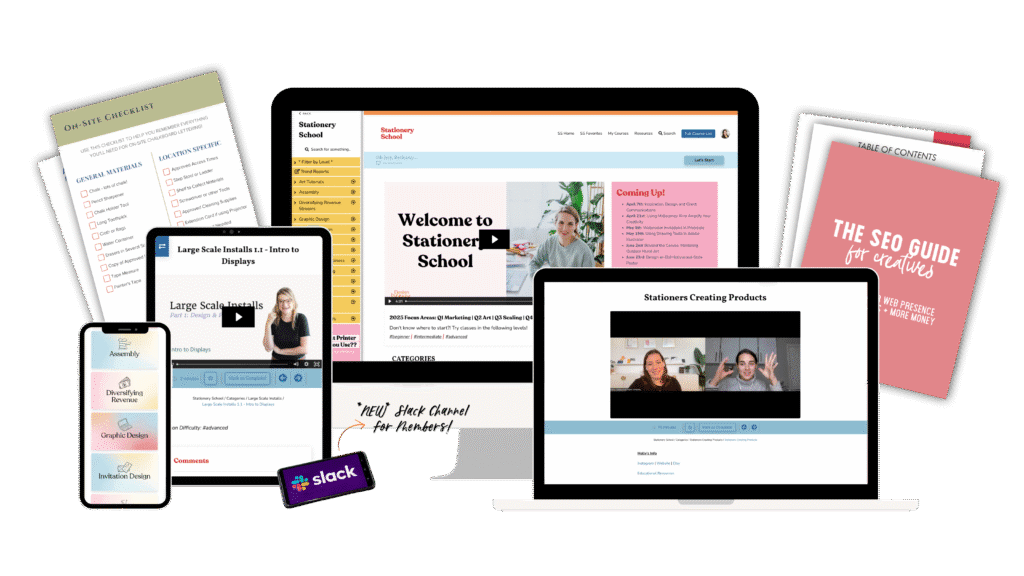
I run our Stationery School membership for wedding invitation designers fully in Kajabi! There is a sales page on our website that goes straight to Kajabi’s checkout, where people can purchase monthly or yearly options.
We purchased a Kajabi Theme from Penny in Your Pocket for our membership, to help organize the over 100 classes that are in there! We use only one ‘product’ in Kajabi for our entire membership, but we organize our classes into searchable categories. I would recommend something like this if your membership keeps getting bigger content-wise.
Once someone joins the membership, we add a tag called “Current Student” and send emails to those tagged 2x a week. Kajabi also has a community you can activate for your members – we don’t use this feature but I know it’s gotten a lot of improvements in the last few years.
Members can manage their subscription directly in the portal, so I don’t have to do a lot of customer service. However they cannot switch from the monthly offer to the yearly offer on their own. My one ask for Kajabi is to make tier-switching like this available for the member/client!
The membership has grown to be the backbone of our business because it provides over $7,000/month in recurring revenue. While it does have ups and downs, we can generally plan on that to remain consistent and continue to grow over time!
Beyond Courses: Selling Digital Downloads and More
A more recent Kajabi addition is the digital downloads feature! This one is helping us phase out Shopify in our business, in addition to their new cart features. You can sell as many digital downloads as you like, only using one “product” in Kajabi.
A bonus of Kajabi’s digital downloads over something like Shopify is that you can package them in different ways. Each digital download can be added to as many offers as you want, so you can sell them in various bundles, add them as an upsell, or just sell them alone. You can even create a shop where people can add multiple products to their cart! Here’s a link to our shop with all our resources to see how it’s set up.
Is Kajabi for Course Creators Worth the Investment in 2026?
There are a ton of other things you can do in Kajabi – these are just the ones we use mostly! Some other examples are:
- Podcasts
- Coaching Communities
- Newsletters
- Events (think: webinar!)
- Full-on Websites
- …and so much more!
I highly recommend you try it out – you can grab the best deal on Kajabi with my affiliate link!


Behind the scenes with your favorite Stationery Auntie Laney (and all the inside scoops!)


